


We are releasing new set of capabilities today, that will let developer teams bring their existing CI/CD pipelines and leverage just LocalOps’s multi-cloud automation to deploy on their cloud account or their customer’s cloud account.
In addition to bringing own cloud account, CTOs/Developers can now bring their code in two ways:
Bring their own code repo (Github, Gitlab, etc.,). Just bring the code, we will build and deploy anywhere.
Bring their own code pipeline / CI-CD pipelines (Jenkins, Github actions, Gitlab CI/CD, etc.,) (from today). You build the code and give us the Image/artifacts to deploy anywhere.
—
Teams take their deployment pipelines pretty serious. They typically consist of steps similar to these:
Checkout code
Run linters
Run static analysis tools
Run tests - unit or end to end
Run dependency vulnerability checks
Compile code (for static languages, frontend frameworks)
Connect with any other system(s) for business specific data pulls and data pushes
Deploy!
They put in a lot of work to design and build them the way they need and their business needs. As long as it works, teams keep the same pipeline for years and don’t necessary go on to iterate often there. And they are built using systems they know, like and have access to. Be it on legacy systems like Jenkins or modern providers like Github actions. We know that and we’ve been there too!
With the new capabilities we’re releasing today, teams can bring these existing code pipeline setups as-such and call LocalOps as the last step to deploy across any number of environments.
Bring your Image Registry
So far, when you connect code repositories, LocalOps will pull the code on every git-push, build it as a Docker Image (even without a Dockerfile), store it in its own secure/private image registry and deploy the image as containers on any cloud environment.
Now, you can add your own private docker registries and configure environments & services to use images from them. It means that you’re building the image yourself.
Just go to the new Registries section and add a new container registry.
We support ECR & DockerHub as of today and plan to support other providers in the coming weeks.
Amazon Elastic Container Registry (ECR)
DockerHub
Google container registry
Azure container registry
Github packages
(Talk to us if you need us to support any other registry).
To use the newly added registry,
Create a new service in your environment
Pick Docker as source
Configure Docker repository
Configure Docker image name
Save and deploy!
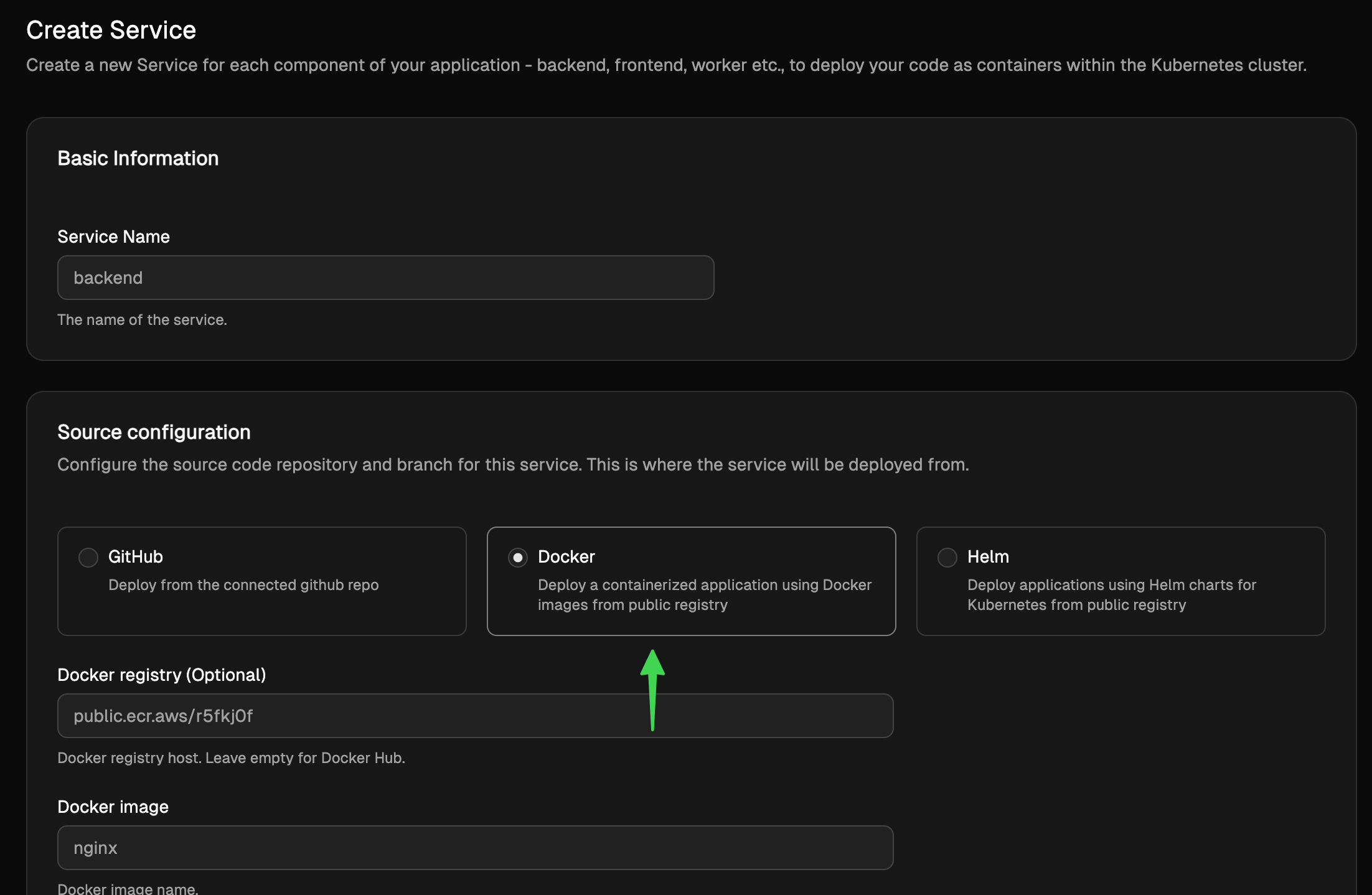
As part of day to day workflows, to deploy the service(s) with new image versions, you can either manually visit LocalOps console and trigger.
Visit LocalOps console
Go to the corresponding environment and service section
Click “Deploy”.
Provide the new image tag.
Confirm and deploy.
Or you can do it all using our new Developer API to trigger deployment directly from your CI/CD runners.
Bring your pipeline - Call the new /deploy API
Using this new API, teams can send authenticated requests to trigger new deployments on any service.
For authentication, just pick the API key that is pre-generated for your account from Account settings.
curl --request POST \
  --url https://sdk.localops.co/v1/environments/{envId}/services/{serviceId}/deploy \
  --header 'Authorization: Bearer <token>' \
  --header 'Content-Type: application/json' \
  --data '
{
  "docker_image_tag": "a1b2c3d4"
}
'
To copy the exact deployment url including correct environment ID and service ID, visit the corresponding Service section and click on Deploy button. Choose API and you will see the pre-filled URL.
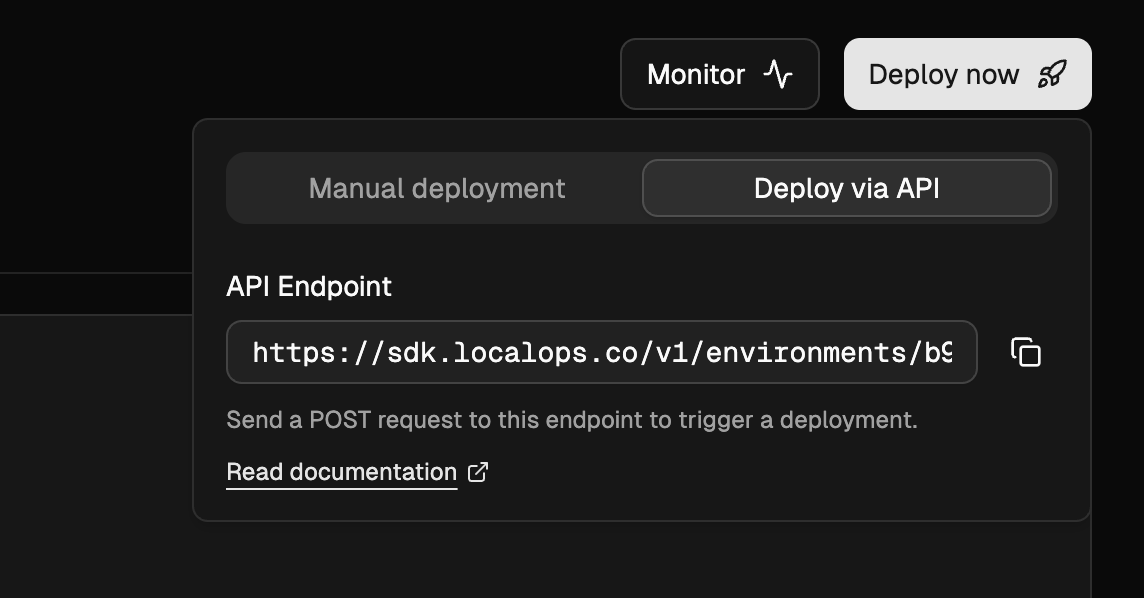
Checkout API reference for more details.
🍦 Use our Github Action:
To cut more of your work, we have also made a readymade Github action for you to embed the deployment trigger directly as a step in your Github workflows like:
- use: localopsco/deploy-action
  with:
    - service: auf-d0923-8rljks-fd9o8
    - environment: afdsfk-j092309-4laskd-jf32
    - token: aslkjadsf-dkjfie-uriw-skjf-19823r
    - docker_image_tag: 1.2.2
You can pass either of these:
docker_image_tag
commit_id
helm_chart_version
Note: You don’t have to build the docker image yourself. You can let LocalOps build the image and yet have control over when you want to deploy. Just turn off Automatic deployments in your service and use above GH action or API call to trigger deployment with a specific `commit_id`:
- use: localopsco/deploy-action
  with:
    - service: askf-d0923-8rljks-fd9o8
    - environment: aldsfk-j092309-4laskd-jf32
    - token: aslkjadsf-dkjfieuriw-skjf-19823r
    - commit_id: $GITHUB_SHA
Example workflows configuration:
name: Deploy

on:
  push:
    branches: [main]

jobs:
  deploy:
    runs-on: ubuntu-latest
    steps:
      - name: Checkout
        uses: actions/checkout@v4

      - name: Trigger LocalOps Deployment
        uses: localopsco/deploy-action@v0
        with:
          api_token: ${{ secrets.LOCALOPS_API_TOKEN }}
          environment_id: ${{ vars.ENVIRONMENT_ID }}
          service_id: ${{ vars.SERVICE_ID }}
          commit_id: ${{ github.sha }}
📖 See the documentation for Github action here: https://github.com/localopsco/deploy-action
Using ops.json
The ops.json lets developers get advanced provisioning and deployment automation with just few lines of simple json declarations placed in their Github repo.
One can set up
periodic health checks
auto-healing, cron jobs
S3 buckets
RDS databases
even spin up ton of child processes to do complicated business procedures
and more
Learn more about ops.json here.
Keeping ops.json in a Github repo let LocalOps pick it up automatically on every new git-push and configure services as intended as part of the deployment.
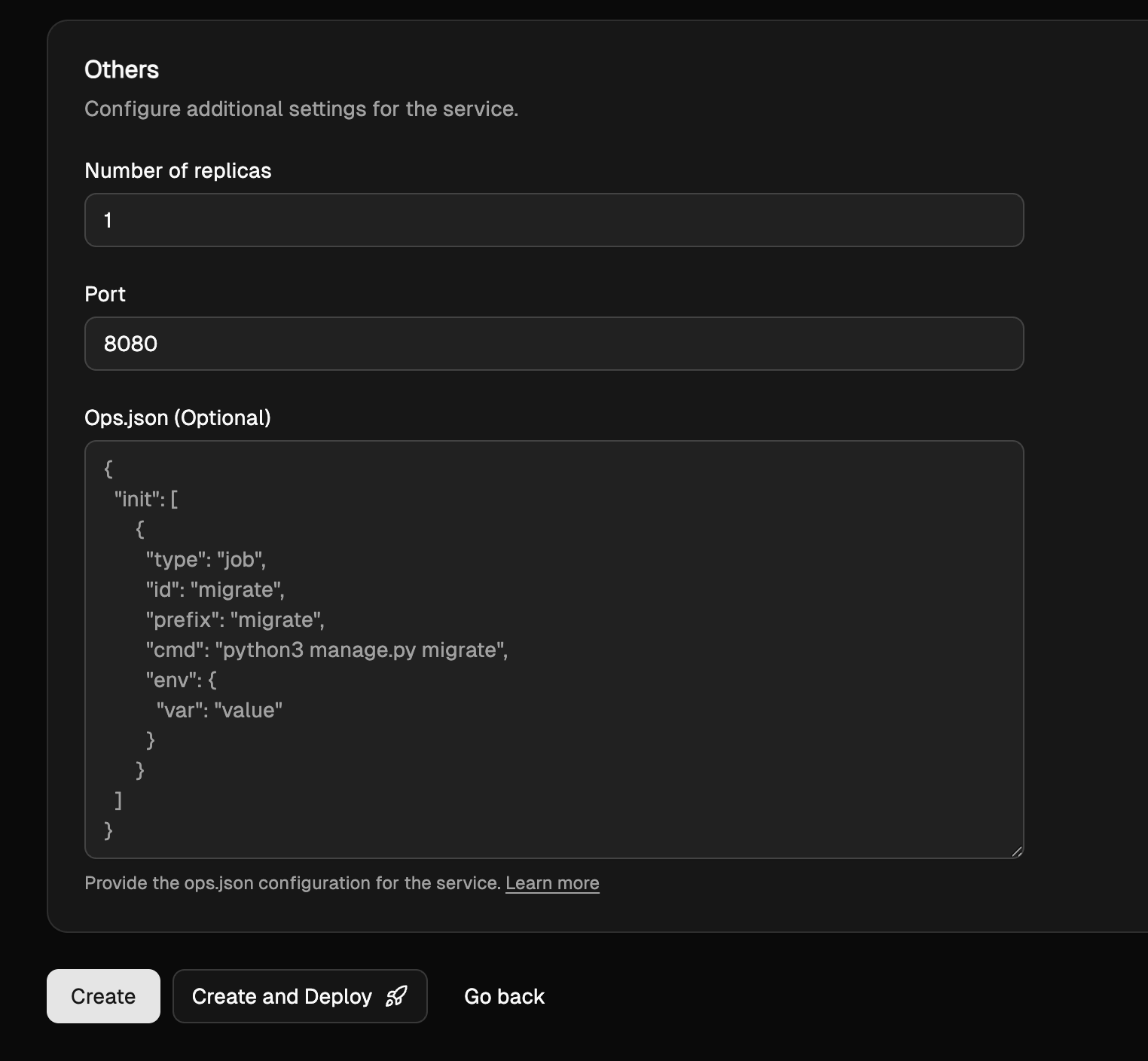
Now, when teams choose to skip connecting their repo, build & host images themselves as part of their build pipeline, they can provide ops.json directly in Service settings within LocalOps console. And it will be used to bring all the same functionality.
Undifferentiated DevOps work offloaded from your developer team:
These are powerful tools you can use in your developer team wherever you prefer and offload all cloud provisioning/configuration/deployment automation which you would otherwise have to spend months learning/writing and years after that in maintaining them.
Get started now:
or Take a 15-min tour to see these advanced deployment automation in action for your developer teams:
Cheers.