

Our customers wanted to isolate people & environments across different projects so that their team doesn’t deploy / see environments they don’t belong to.
We re-imagined and re-built Projects to solve this.
Along the way, we made a ton of UI enhancements to make it easier to create multiple projects, switch between them and isolate cloud environments with clarity.
We consciously didn’t invest time in building complicated RBAC features to make things simple for admins to govern environments and easier for teams to isolate and secure resources without getting into Spaghetti full of permissions and roles configurations.
Projects
A project is a place where environments and members working on one product or client or an agenda can be grouped together in one place. Go to “Projects” section under Organization menu to create/manage projects.
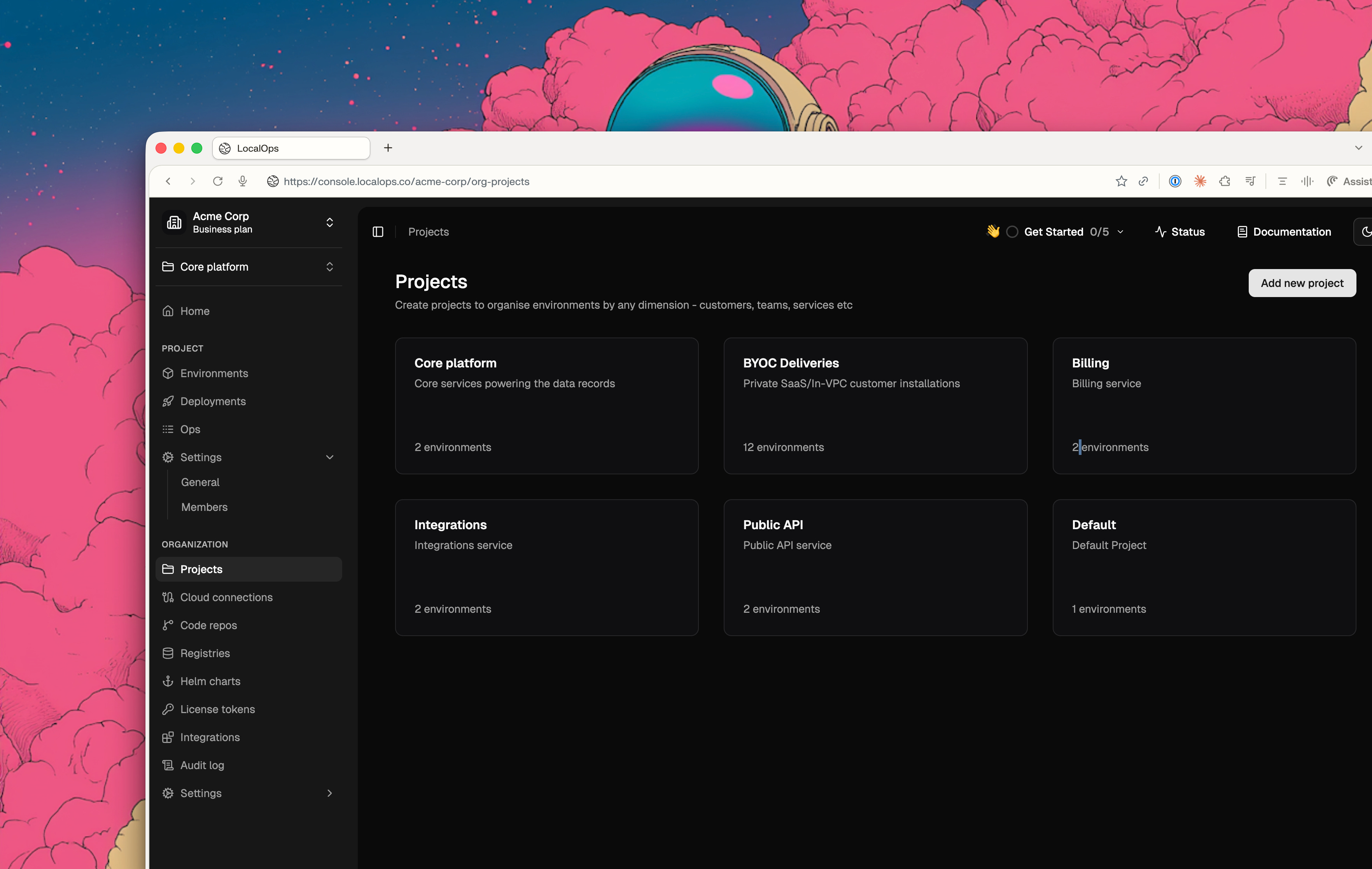
Say you’re building an Agentic CRM product. You can create a project and organize environments as follows.
Project Name: Agentic CRM
Environments you can create and group under the project:
CRM QA
CRM UAT
CRM Production
Members: Can include people who work on the CRM project. Unless they belong to the project, they won’t be able to access or deploy in above environments.
Unless someone belongs to Agentic CRM project, they can’t see or deploy in above environments.
Another example - say you are product studio/agency and your dev team is building applications for a client - Acme Co. You can then create a project as follows.
Project Name: Acme Co
Environments:
ACME QA
ACME UAT
ACME Prod
Or say you have BYOC distribution for your service for your enterprise customers and you’re deploying & managing such environments on the customer’s cloud accounts as In-VPC distribution, you can have a project as follows. And assign specific DevOps engineers to manage such customer environments.
Project Name: BYOC distribution
Environments:
Acme Co
Heist enterprise
Trust bank
and so on..
Default project: For every new signup/organization, we create a “Default" project for convenience. Any number of additional projects can be created as appropriate to your setup.
Brand new navigation:
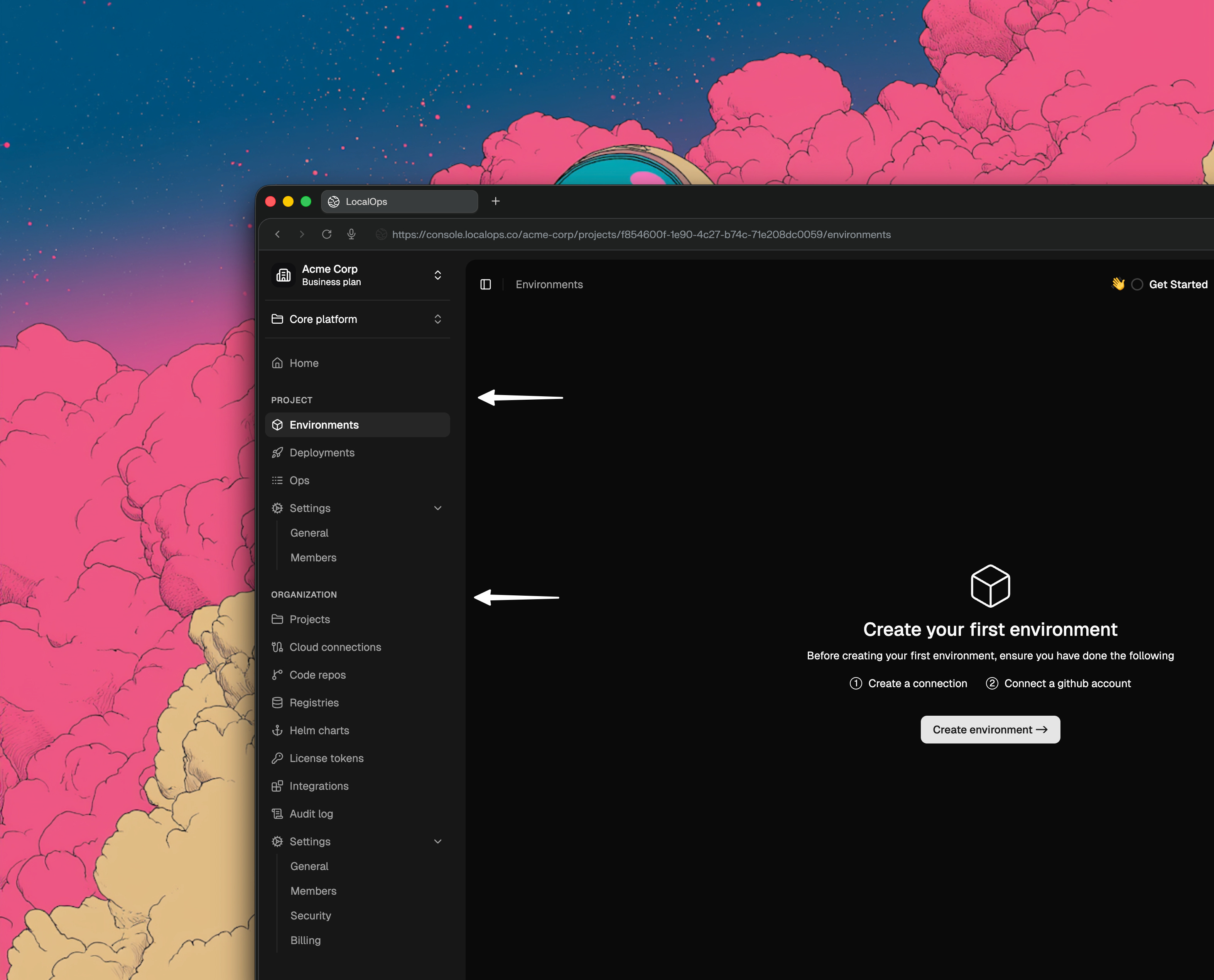
Until now, the sidebar navigation had a flat menu structure that let users navigate between environments, connections and code repositories.
With Projects coming in as a native group method, we are introducing a project switcher at the top so users can switch between their projects in 1-click.
And we have cleaned up all the menu structure to clearly indicate which menus belong to a Project scope and which ones belong to their Organization’s scope. This gives clarity over what is isolated and grouped under projects and what functionality works at the organization scope.
New clean URLs:
We put a lot of effort in making the platform super simple to navigate and are a big fan of clean URLs.
We have now cleaned up all the page URLs of the console (& our product documentation 😅) so that they now have a URL clearly indicating the hierarchical context of capabilities (Orgs > Projects > Environments).
Some examples for you:
https://console.localops.co/localops-inc/org-projects
https://console.localops.co/localops-inc/projects/65a299d7-a1ee-4547-8f3e-14e6d0b61dd6/environments
https://console.localops.co/localops-inc/projects/65a299d7-a1ee-4547-8f3e-14e6d0b61dd6/members
https://console.localops.co/localops-inc/projects/65a299d7-a1ee-4547-8f3e-14e6d0b61dd6/deployments
https://console.localops.co/localops-inc/connections
Our roadmap has more capabilities coming in to let teams organize their setup and manage their AWS environments with much more ease.
Want to solve similar problems in your cloud operations?
Get started with a quick demo at https://go.localops.co/tour. Our engineers will guide you with a personalized tour.
Cheers.